Spoken Sound Recording Tips, Nabdwip's office.
MdBR
- 7 May 2001 Index of In-House office tips
Updated 20 May 2001
As of 7 May 2001 in the office the only way to record from a microphone
is: using
Best Results so far have been achieved as follows:
- -use a microphone going into the Pankaj office stereo, with the PB5300cs
plugged into the "Line- Out" of the Pankaj.
- -use the Realistic unidirecctional microphone (the one with
the backplate).
- -UNPLUG ALL unnecessary electrical items in the room so as to avoid
surprise clicks throughout the recording.
- -Run the PB5300cs on it's battery (also to avoid clicks)
- -Record into programme SoundEdit16. 16 bit. Mono. 22,025KHz. AIFF fomat.
ALWAYS ensure autogain is OFF.
- -Ensure the 'Tape/Aux/CD' button is depressed (otherwise much lower
quality recording,).
- Put input recording level to 3.8 and remeber to do it every time!
- -always listen on headphones while you read, especially to catch those
unexpected clicks that still happen.
- Before proofing and editing, amplify by 500% (when using the above
setup) so the graph can be seen easily.
Other recording tips.
- Ensure the microphone cable doesn't touch anything to cause
sound. If using a mike stand clipped to the table, make sure the microphone
is insulated from all vibrations by using foam.
- Turn off all unneccessary electrical aperatus in the room, to
reduce chance of interference.
- Ensure the little adaptor power supply for the PowerBook PB5300 is
not anywhere near the Pankaj machine. Best is to only run the PB5300 on
its internal battery while recording. It sometimes causes electrical clicks.
If using the 'Shure' head-band microphone:
-Ensure Preferances/Auto-gain is Off, then Amplify by 2,500%(!).
(This 'Shure' microphone is just too quiet).
Cleaning the Audio, and making CDs
- After editing, separate into separate smaller files (i.e
by chapter, etc.) Ensure names are correct both in the file and in the
info about the file in the SoundJam playlist and keep these safe.
- Then, using SoundJam convert files to aiff 44.1Khz stereo.
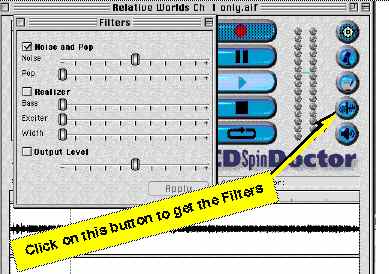
Then process with CDSpinDoctor to reduce background hiss (see illustration)
and perhaps adjust the output volume, but err on the "not too loud"
side, otherwise portable AudioCD Players may heavilly distort the sound.
N.B. CDSpinDoctor only digest 44.1KHz stereo files, aiff.
In general: remove hiss by adjusting the first slider slider only until
the hiss has just gone.
- Then, to save space without any loss of anything, convert
to MONO 44.1KHz
- Make CDs from these files. CDs can only be burned from
44.1 khz files, either Mono or Stereo.
There is no perceptible difference (to me) of making a CD from
a 44.1Khz mp3 or a similar aiff file, at least this is so when using the
G3. In addition, as an experiment, we swent 8 times mp3 to aiff to mp3
to aiff.... with no perceptible loss of sound.
- For practical storage, make into mp3 files: 44.1 khz
Mono 64kbps,Best. But check the machine you are using. The PowerBook 5300cs
doesn't do a good job of this. And, before making the mp3 file, ensure
it's name is correct before dragged into the SoundJam window.
Other tips for making Audio CDs.
- Don't make them too loud!!!! Err
on the quiet side, to be safe, otherwise Diskmans are likely to nastily
distort the sound. Here are two example files, one
is too loud, and distorts on a Diskman, though not on a Mac, and one
is erring on a bit low
but it is safe! (If u can't hear these files, you'll
have to get the files from the hard drive, 'cause their too big for me
to upload!)
- Many Audio CD players cannot access the middle of a track,
so keep the tracks short.
*After* final proofing and editing
of SoundEdit file, maybe send it once through CDSpinDoctor
to reduce the hiss and maybe increase the sound. It needs the G3 and still
takes ages. CDSpinDoctor only digests stereo 44.1 KHz files.
*Before*
converting into mp3 format, using SoundJam, drag all into
a Playlist in SoundJam, then do Apple I to get info, and ensure (or give)
each track it's proper name and any other info you want.
NOTE: SoundJam seems liable to cut off the last couple of seconds,
therefore when recording a Master Tape
from Sound Jam, always enusre there are 4 seconds of silence
at the end of each track, and add 2 seconds to the actual ending time of
a track in those cases where a track is only partly being recorded onto
one side of a tape. Check tape and remove any unwanted additional words.
(While doing this, ensure the Tape/Aux/CD on the Pankaj machine is depressed
otherswise there's a click.) This applies to this and to all files below.
(See Note above)
Also it's worth reading
the related items about sound in the
"How to Use MiniDisk Player", etc.
Generic Text to Add at end
of each Spoken Book:
For further information about this book and its subject matter, please
contact:
The Secretary,
Sri Chaitanya Saraswat Math,
Kolerganj,
Post Office: Nabadwip,
District: Nadia
West Benal, India, Postcode 741302
Our email address is govindam@scsmath.com, that is **spelled out**
In addition you are welcome to visit our Website: scsmath.com
Index of In-House office tips